

⭐ Try it in your browser first — download only if you love it.
✅ Kid-safe • ✅ No ads • ✅ Free forever
Color Kingdom
Finished 4/14/2026
Released 4/23/2026
Platforms: Windows, Linux, Android
Screenshots
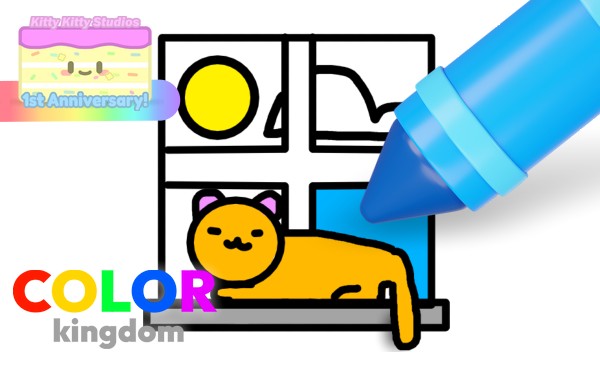
A coloring book full of cute things! Color Kingdom is an adorable coloring book for kids and cozy snugglers who want to relax and draw at their own pace.
⭐ Safe & Family-Friendly Download
- ✅ 100% Free Game
- ✅ Direct download — no extra software required
- ✅ Safe, cute, and family-friendly
- ✅ Made by Kitty Kitty Studios

Download for Linux ColorKingdom_0.1_Linux.zip ✅ Developer-provided download
📱 This game is installed outside the Google Play Store, so your device may show a brief system message during installation. You can continue normally if you choose to install 💙
Download for Android ColorKingdom_0.1_Android.apk ✅ Developer-provided download
Important Note (Android)
Our games are independent apps not distributed through the Google Play Store, so Android may show a standard security warning during installation.
This does not automatically mean the app is unsafe — it simply means Android has not seen this app in the Play Store system.
System Requirements
Windows:
OS: Windows 10 or later
Disk Space: 100MB Minimum
RAM: 4GB; 8GB recommended
DirectX: 11
GPU: Integrated graphics minimum
CPU: Intel Pentium minimum
Linux:
Debian: 8 or later
Distro: Ubuntu 16.04 or later / CentOS 7
Disk Space: 100MB Minimum
RAM: 4GB; 8GB recommended
GPU: Any OpenGL 3.2+ capable GPU
CPU: Intel Pentium minimum
Android
OS: Android 5.1 or later*
Disk Space: 100MB Minimum
* Starting likely early 2027, we might be moving our Android games to the Play Store, raising the requirement to Android 7.1
Game Tags
Cute, Colorful, Relaxing, Squishy, Cartoon
How to Install
Windows:
1. Click "Download now!"
2. When the download has finished, open it and open README.txt
3. Follow the README's instructions carefully.
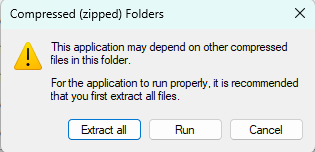
What happens if I double click the game exe when still compressed?
Linux:
1. Click "Download for Linux"
2. When the download has finished, open the tarball in Archive Manager or similar
3. Extract the tarball
4. Open the extracted folder and double click ColorKingdom.x86_64
Create a link to the x86_64 file on your desktop for easy access. If the game does not launch, open the terminal at the game's location and type chmod +x GameName.x86_64Android:
1. Tap "Download for Android"
2. When the download finishes, open the file to install it
3. If your device shows a message from Google Play Protect, this is normal for apps downloaded outside the Play Store
You can continue by tapping “Install anyway” or “Scan” if prompted
Read this topic for more information
4. Wait for installation to finish, then open the game from your app list 🎮
Changelog
Version 0.1 (Beta)
First-ever version of the game.
Game News
Version 0.1 Beta releases!
Sit back, relax, and start coloring today.